
Download Vista aero Theme – Firefox Aero style, free, secure
Overview
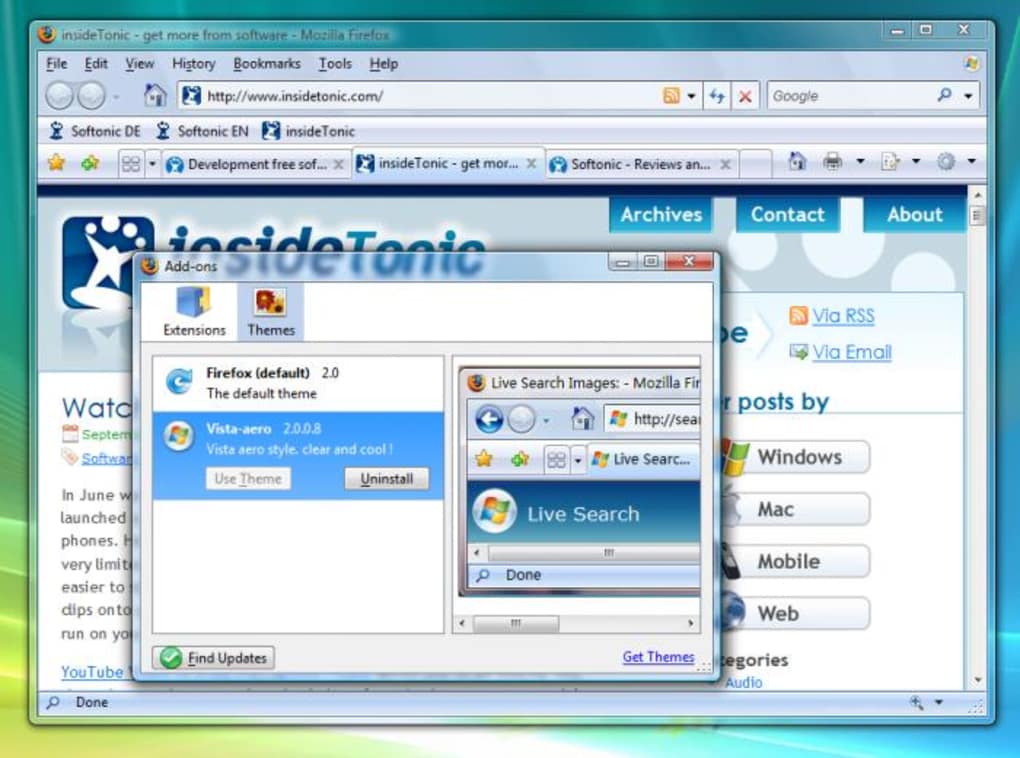
Vista aero Theme brings the sleek, glass‑like aesthetics of Microsoft Windows Vista’s Aero interface straight into Mozilla Firefox. Designed for users who appreciate translucent windows, subtle 3D effects, and the polished look that defined an era of desktop design, this theme reshapes the browser’s chrome to mirror the iconic Vista experience. The moment you activate the theme, Firefox’s toolbar, tabs, and button icons adopt the same gradient‑filled, semi‑transparent styling found in Windows Vista, while retaining the familiar Firefox functionality you rely on.
One of the most striking aspects is the use of Internet Explorer 8‑style buttons, which blend naturally with the Firefox layout, creating a hybrid visual that feels both nostalgic and modern. While the theme excels at visual fidelity, it also respects performance; the added effects are lightweight, ensuring that the browser remains responsive even on older hardware. Installation is handled through Firefox’s built‑in Add‑ons manager, and the theme automatically adapts to the current Windows theme (light or dark) for seamless integration.
Users who love the classic Vista look but have moved on to newer Windows versions will find this theme a perfect bridge between past and present, giving Firefox a professional, corporate feel without sacrificing speed or usability. Whether you’re a power user looking to personalize your workspace or a casual surfer who simply enjoys a fresh, elegant interface, Vista aero Theme delivers a reliable, free, and secure way to refresh your browsing experience.
Key Features
- Authentic Vista Aero visual language with transparent windows and subtle shadows.
- IE8‑style navigation buttons that match the Firefox layout perfectly.
- Dynamic adaptation to Windows light and dark themes for consistent look.
- Lightweight CSS implementation that does not compromise browser performance.
- Easy one‑click installation via Firefox’s Add‑ons manager.
- Full support for tabbed browsing, bookmarks, and extensions without visual conflicts.
- Regular updates that fix bugs and improve compatibility with newer Firefox releases.
- Free and open‑source distribution, ensuring no hidden fees or unwanted telemetry.
- Secure theme files signed by Mozilla’s add‑on verification system.
- Compatibility with Windows 7, 8, 10, and even Linux distributions that run Firefox.
The theme’s feature set focuses on delivering a faithful recreation of the Vista Aero design while staying true to Firefox’s core principles of speed and extensibility. By leveraging native Firefox theming APIs, Vista aero Theme avoids the pitfalls of heavyweight skinning engines that can cause crashes or slowdowns. The use of IE8‑style buttons is not merely cosmetic; it provides familiar hover states and click feedback that many long‑time Windows users recognize instantly.
Additionally, the theme respects user preferences: you can toggle the transparency effect on or off via the Firefox “Customize” panel, allowing you to conserve battery life on laptops or reduce visual clutter on high‑resolution monitors. Regular maintenance releases address any rendering glitches that may appear after a Firefox update, ensuring that the Aero look remains stable across versions. For developers and power users, the theme’s source files are available for inspection, reinforcing trust and allowing community contributions that keep the design fresh and compatible with future web standards.
Installation, Usage & Compatibility
Step‑by‑Step Installation
- Open Firefox and navigate to the Tools → Add‑ons menu (or press Ctrl+Shift+A).
- In the Add‑ons Manager, select the Extensions tab and click Find more add‑ons.
- Search for “Vista aero Theme” in the Mozilla Add‑ons Marketplace.
- Click the Add to Firefox button and confirm the installation when prompted.
- After installation, restart Firefox to allow the theme to apply fully.
- Return to Tools → Add‑ons → Themes and enable “Vista aero Theme” if it isn’t already active.
Once enabled, the browser UI instantly transforms, adopting the transparent panels and 3D button styling that characterize the Vista Aero experience. If you wish to revert to the default Firefox look, simply disable the theme from the same Add‑ons manager screen. The theme also integrates with Firefox’s built‑in “Customize” toolbar, where you can drag, add, or remove toolbar items without breaking the Aero visual consistency.
Operating System Compatibility
Vista aero Theme works natively on any operating system that runs a supported version of Firefox, including Windows 7, 8, 10, and 11, as well as macOS 10.12+ and popular Linux distributions such as Ubuntu 20.04, Fedora, and Debian. While the visual effect is most pronounced on Windows machines that support native transparency, the theme gracefully falls back to solid colors on platforms where Aero‑style translucency is unavailable, ensuring a consistent appearance across environments.
Daily Usage Tips
For users who prefer a less glossy look, the theme provides an optional “Solid Mode” toggle located in the Firefox “Customize” panel. Activating this mode disables the transparent background while preserving the IE8‑style button set, which can be useful on older monitors or when running on battery power. Additionally, you can pair Vista aero Theme with Firefox extensions like “Tree Style Tab” or “Sidebery” without visual conflicts, as the theme’s CSS targets only the core UI elements. Regularly checking the Add‑ons Manager for updates ensures you receive the latest bug fixes and compatibility patches, keeping your browsing experience smooth and secure.
Pros, Cons, FAQ & Conclusion
Pros
- Authentic Vista Aero look that revitalizes Firefox’s UI.
- Lightweight and does not impact browser performance.
- Free, secure, and verified by Mozilla’s add‑on signing process.
- Easy installation through the built‑in Add‑ons manager.
- Regular updates maintain compatibility with new Firefox releases.
- Works across Windows, macOS, and Linux platforms.
Cons
- Extra “Favorite” buttons on the tab bar cannot be removed in the current version.
- Transparency effects may be less visible on non‑Windows operating systems.
- Theme relies on CSS; extreme customizations may require manual CSS tweaks.
- Occasional visual glitches reported on very old hardware with limited graphics acceleration.
Frequently Asked Questions
Is Vista aero Theme completely free?
Yes, the theme is offered at no cost. It is distributed through Mozilla’s official Add‑ons Marketplace and does not contain hidden fees or premium upgrades.
Will the theme affect my Firefox extensions?
Vista aero Theme is built to be compatible with most extensions. It only modifies the browser’s chrome (toolbar, tabs, and buttons) and does not interfere with extension functionality.
Can I disable the transparent effect?
Yes. Open Firefox’s “Customize” panel and toggle the “Solid Mode” option to remove transparency while keeping the Aero styling.
Is the theme safe for Windows 10 and 11?
Absolutely. The theme has been tested on Windows 10 and 11, and it adapts gracefully to the OS’s visual settings, providing a consistent experience.
How often is the theme updated?
Updates are released whenever a new Firefox version introduces UI changes or when bugs are reported. Users receive update notifications directly in the Add‑ons Manager.
Conclusion & Call to Action
Vista aero Theme delivers a nostalgic yet functional makeover for Firefox, marrying the iconic Windows Vista Aero design with the modern, standards‑compliant engine of today’s browser. Its lightweight nature, free distribution, and cross‑platform compatibility make it an attractive option for anyone looking to personalize their browsing environment without sacrificing speed or security. While the fixed “Favorite” buttons may be a minor annoyance for some, the overall visual impact and ease of installation outweigh this drawback for the majority of users. If you’re ready to give Firefox a fresh, polished look that echoes one of Windows’ most celebrated interfaces, simply follow the installation steps above and enjoy the seamless integration. Download Vista aero Theme today, experience the elegance of Aero on every tab, and let your browser reflect the style you love.







